The Cyber Power App Index: A Digital Nutrition Guide
"Stop asking 'Is it safe?' and start asking 'Is it nutritious?' The Digital Diet, plus safety ratings for Minecraft, YouTube Kids, and more."
Stop asking, "Is it safe?" and start asking, "Is it nutritious?".
The rules of just counting "screen time" are evolving as we move from being "digital natives" to an "AI-native" generation. Technology is no longer just a tool for looking things up; it is an active partner that can talk, create, and influence how my children see the world.
As an IT professional and a mother, I see the "digital perimeter" as a space for cognitive growth. Here is how I use the Cyber Power framework to keep my children’s digital plates healthy and balanced.
How I Use the "Digital Nutrition" Framework
I don't rate apps as simply "Good" or "Bad" because context is everything. Instead, I look at the Competence required to use them safely and the Risk Level they present to a child's developing brain.
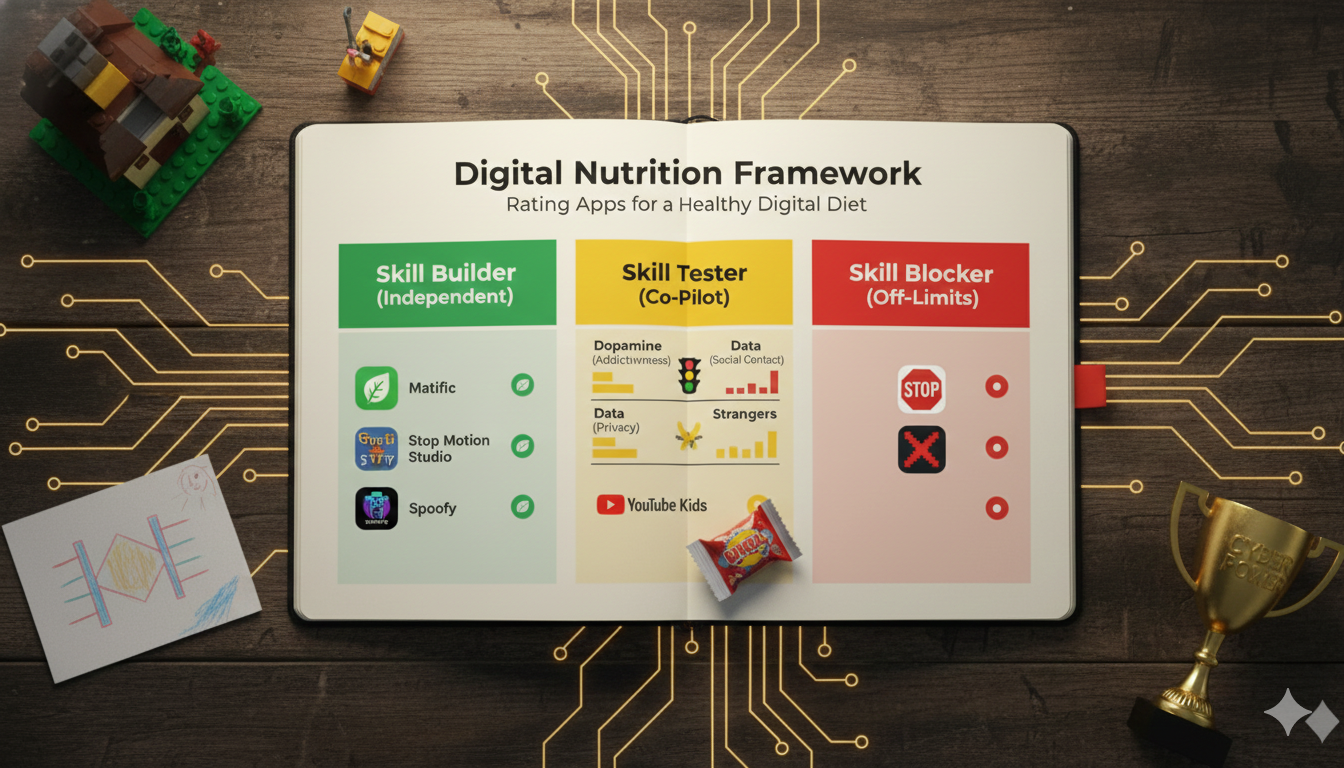
Think of this like a Nutrition Label for our digital pantry where, just as I check food labels for sugar and allergens, I check apps for Dopamine (addictiveness), Data (privacy), and Strangers (social contact).
The 3 Pillars of a Balanced Digital Diet
Every verdict you see below is based on three specific criteria that align with our family's "Cyber Power" philosophy.
1. Content (The Architect vs. The Consumer): Does the app treat my child as an active Architect who builds and codes, or a passive Consumer who just watches? I prioritize "Creator Logic"—apps that reward effort and patience.
2. The AI Ingredient (Support vs. Shortcut): Is AI a "Force Multiplier" for imagination, or a "Black Box" that does the thinking for them? I look for tools that expand imagination rather than replace it.
3. Commercialism: The Perimeter (Data & Privacy): Is the app providing a service, or is it harvesting data to train global models? I am careful with apps that look educational but function as surveillance tools.
The Verdict Legend
These apps are the "Digital Spinach" (healthy) or "Kitchen Utensils" (useful tools) in our home that support autonomy and respect a child’s pace. Because they have zero social contact and zero manipulative ads, they match Competence Level 1 (Basic Respect).
- Supervision Style: "Auditory Supervision" — I am in the room (listening), but I don't need to hover over their shoulder.
- The "First Draft" Rule: I encourage brainstorming or sketching on paper before opening the tool to fire up neural pathways first.
- The "Sandwich Method": The child provides the Intent (Top Slice), the tool helps Ideate (The Filling), and the child performs the Final Execution (Bottom Slice).
These are "Whole Grains"—great for growth but carrying risks like algorithmic feeds or public chat that challenge a child's self-control. These apps require Competence Level 2 (Critical Thinking & Self-Regulation).
- Supervision Style: "Visual Supervision" — Think of this like a driving lesson. I must configure the safety settings first and stay in the "passenger seat" to help them spot the hazards.
- The Protocol: "Think Aloud." I narrate my own use of algorithms to teach awareness (e.g., "The app is recommending this based on my past, not what I need now").
- The Game: "Trust but Verify." We hunt for "hallucinations"—times when AI gives a wrong answer with absolute confidence.
We restrict these apps not just because they are "risky," but because they actively prohibit the learning of necessary skills. If an app is designed with a hyper-aggressive algorithm to overpower a child's "Internal Brake" (Self-Regulation), or if its privacy defaults bypass their "Data Shield," it is an obstacle to their growth.
- The Rule: You cannot learn to drive in a car that has no brakes and a stuck accelerator.
Selected App Reviews
Minecraft
- The Nutrition Profile: This is the digital equivalent of a box of Lego. It offers immense creative potential ("whole grain"), but it carries a risk because of the "Multiplayer" button.
- The Draw: Kids love it because they can build worlds.
- The Risk: The "Public Servers" (like Hypixel) are where moderation is loose and strangers congregate.
- My Strategy: We treat this as a creative tool, not a social network.
- Home Mode: We strictly forbid "Public Servers." We subscribe to a private "Realm"—a closed server where my child plays only with known school friends.
- Travel Mode: When we fly or drive, Minecraft is our go-to "Offline Activity." Without Wi-Fi, the multiplayer risk vanishes, and it becomes a pure, distraction-free architecture studio.
YouTube Kids
- The Nutrition Profile: Despite the "Kids" branding, this app is a "Candy Store." It is high in dopamine and designed to encourage passive consumption.
- The Draw: Infinite cartoons and entertainment.
- The Risk: Even with filters, kids can find "junk" content—loud, fast-paced videos of people screaming over video games or "unboxing" toys. It overstimulates young brains quickly.
- My Strategy: I never use the default setup. I go into the settings and select "Approved Content Only." This effectively breaks the algorithm. It disables the search bar and transforms the app from an infinite candy store into a small, curated library of only the specific channels I have hand-picked (e.g., Bluey, National Geographic).
Matific
- The Nutrition Profile: This is "Digital Spinach"—pure educational value. It is one of the few apps that is strictly for learning, with no ads, tracking, or social contact.
- The Draw: Gamified math puzzles.
- The Risk: Zero safety risk. The only "risk" is that they might find it boring compared to Roblox.
- My Strategy: In our home, we distinguish between "Entertainment" and "Work." Matific is classified as "Digital Work." I give my child full agency here to choose which math islands to explore, allowing them to work independently.
Stop Motion Studio
- The Nutrition Profile: This is a "Kitchen Utensil." It is a pure creation tool that lets kids make their own Lego movies using the camera. It has no feed, no chat, and no ads (in the paid version).
- The Draw: Making movies.
- The Risk: Very low. It transforms the iPad from a TV (passive) into a Camera (active).
- My Strategy: We use this to practice patience. Making a 10-second movie takes 30 minutes of focus. It is the perfect antidote to the instant gratification of TikTok/YouTube.
Spoofy (Estonian Safety Game)
- The Nutrition Profile: This is "Digital Vitamin C." It is a web-based game designed specifically to teach cyber safety skills.
- The Draw: Fun, story-driven gameplay.
- The Risk: None. It is a single-player story mode.
- My Strategy: We play this together on "Rainy Sundays." It gives us a shared language. When real drama happens in a WhatsApp group later, I can ask, "What would we do in Spoofy?"
Overcooked 2
- The Nutrition Profile: This game is a "Relationship Simulator." It contains no violence or stranger danger, but it is incredibly stressful. It requires players to coordinate cooking orders in a chaotic kitchen.
- The Draw: Cooperative chaos.
- The Risk: The risk isn't strangers; it's shouting at your siblings. The frustration level is high.
- My Strategy: We never send the kids to play this alone. We play it as a family "Co-Pilot" game. When the shouting starts, we hit pause. We use the frustration as a live opportunity to practice "Grace and Courtesy," discussing how we can communicate distinct commands kindly even when the kitchen is on fire.